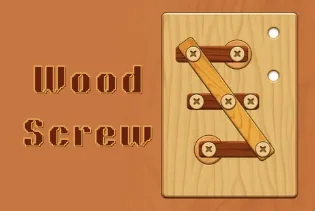
Wood Screw







Wood Screw
- Puzzle
- Wood Screw
Introduction
Wood Screw is a single-player logic puzzle about screws, wooden boards, and open holes. Each level shows boards held together by screws. Your goal is to free the boards by moving the screws in the right order. Some boards cover other parts, so one move can open or block the next step.
Planning matters more than speed. Before moving a screw, check which board it holds and where that board may fall. You also need a legal open hole for each screw you move. Filling the wrong hole can leave you with no way to continue.
Several games use the name Wood Screw or Wood Screw Puzzle. This description covers only the basic screw-and-board play shown in the hosted game. Features found in other versions may not be available here.
Gameplay
Each puzzle contains wooden boards, screws, and empty holes. Boards may overlap, which creates a set order for solving the level. A board in front can hide a screw or stop another board from falling.
Select a screw, then place it in a valid empty hole when the game asks for a destination. Once a board loses its last support, it may fall away. The space below it must be clear.
A move can be legal but still cause trouble later. Moving a screw into the wrong hole may block a board or use a space needed for another screw. Study the whole layout before you act, then clear the required boards to complete the level.
How to Play
First, inspect the full puzzle. Find the screws that hold each board and note which boards sit in front of others. Look for open holes that can receive moved screws.
Choose a board that can fall without hitting another piece. Check every screw that supports it. If a different board blocks its path or covers one of its screws, work on that board first.
Move one screw at a time and watch what changes. A falling board may reveal a hidden screw or open a new hole. It may also cover a useful space, so do not rush into the next move.
Continue until the required boards are gone. If there is no useful open hole and no board can be released, the move order may have created a dead end. Restart the level and try a different first step.
Game Mechanics
Overlapping boards create dependencies. You may need to clear a front board before reaching the screws behind it. Tracing which piece blocks another can reveal the correct order.
Empty holes provide space for relocated screws. Treat them as limited resources. A central hole may work for several moves, so filling it too early can stop your progress.
Gravity affects a board after its final support is removed. Check the area below the board before making that move. Another piece or a badly placed screw may block its path.
A screw may not move if there is no valid destination or if the target hole is occupied or covered. Even when the game accepts a move, that move may lead to an unsolvable layout.
Levels and Difficulty
Wood Screw is divided into separate logic levels. Each level has its own layout of boards, screws, and holes. You must solve the current arrangement before moving on.
Later or harder layouts may use more overlapping pieces and leave fewer clear opening moves. The exact number of levels and any limits can differ between builds, so no fixed count is given here.
Tips and Strategy
- Trace each board before moving anything. Find all of its screws and check what blocks its fall.
- Keep useful holes open. Do not fill a flexible hole unless you know how it helps the next move.
- Start with an exposed board when its path is clear. Removing it can reveal screws and create more space.
- Think one step ahead. Work out which hole may open after a board falls and which screw could need it.
- Check where a relocated screw will sit. It could block another board even if the move is allowed.
- Restart when every useful hole is filled and no board can be freed. A different opening move may prevent the dead end.
Controls
- Desktop: Click a screw to select it.
- Destination: Click an available hole when the game asks you to move the selected screw.
Troubleshooting
If the game does not start, reload the page. A browser extension may also block embedded game content.
If a screw will not move, check the destination. The hole may be occupied, covered, or invalid. You may need to select the screw before selecting the target hole.
If no useful move remains, the current sequence may be a dead end. Use the restart option if it is available, then try another order.
FAQ
What is the goal of Wood Screw?
Ans: Move the screws in the right order so the required wooden boards can fall away. You must account for overlapping pieces, open holes, and gravity.
Which screw should I move first?
Ans: Look for an exposed board with a clear path below it. Check all of its supports and avoid using an open hole that will be needed for another move.
Why will a screw not move to an empty hole?
Ans: The hole may be covered, blocked, occupied, or invalid for that screw. The game may also require you to select the screw before choosing the hole.
What should I do if I run out of useful moves?
Ans: The puzzle may be in a dead end. Restart the level if that option is shown, then choose a different opening move or keep a useful hole free.


Comments (0)